Receipt, cash drawer and label printing for Node.js and Electron
retail-print-kit is an open source npm package that prints to ESC/POS thermal receipt printers (Epson and compatibles), Star printers including the TSP100, and ZPL, TSPL and EZPL label printers, over USB, network or serial.
npm install retail-print-kitA plain install is 4 packages and under 2 MB with no native modules. MIT licensed, TypeScript types included, Node 18 or newer.
Print a receipt in ten lines
const { Printer, profiles } = require('retail-print-kit');
const { NetTransport } = require('retail-print-kit/net');

const printer = new Printer(new NetTransport('192.168.1.50'), profiles['epson-tm-t88']);
await printer.open();
printer
  .align('ct').style('b').size(2, 2).text('MY STORE')
  .size(1, 1).style('normal').align('lt')
  .tableCustom([{ text: 'Coffee', width: 0.7 }, { text: '$2.50', align: 'RIGHT', width: 0.3 }])
  .qr('https://example.com/receipt/1042')
  .cut().cashdraw();
await printer.close();
What it does
- Receipt printers: Epson TM-T88, TM-T20, TM-m30 and ESC/POS compatibles (Bixolon, Citizen, SNBC, Xprinter, Rongta, HPRT); Star TSP650II and mC-Print3 in Star Line Mode; Star TSP100 and TSP143 in raster mode.
- Cash drawers: kick pin 2 or pin 5 with the right pulse for the printer.
- Label printers: one label definition encoded as ZPL (Zebra), TSPL (TSC, Xprinter, Rongta) or EZPL (Godex).
- Connections: raw TCP on port 9100, USB and serial.
- Templates: receipts and labels as JSON with data placeholders, loops and conditions.
- Previews: HTML, PNG and SVG of exactly what will print, with no printer attached.
- Printer status and discovery: paper out, cover open, cutter error, drawer state; find printers on the network and identify the model.
- A visual designer in the browser and a CLI for testing hardware.
The designer
Build a receipt or a label visually and export the JSON template your app prints. It runs entirely in your browser; nothing is uploaded.
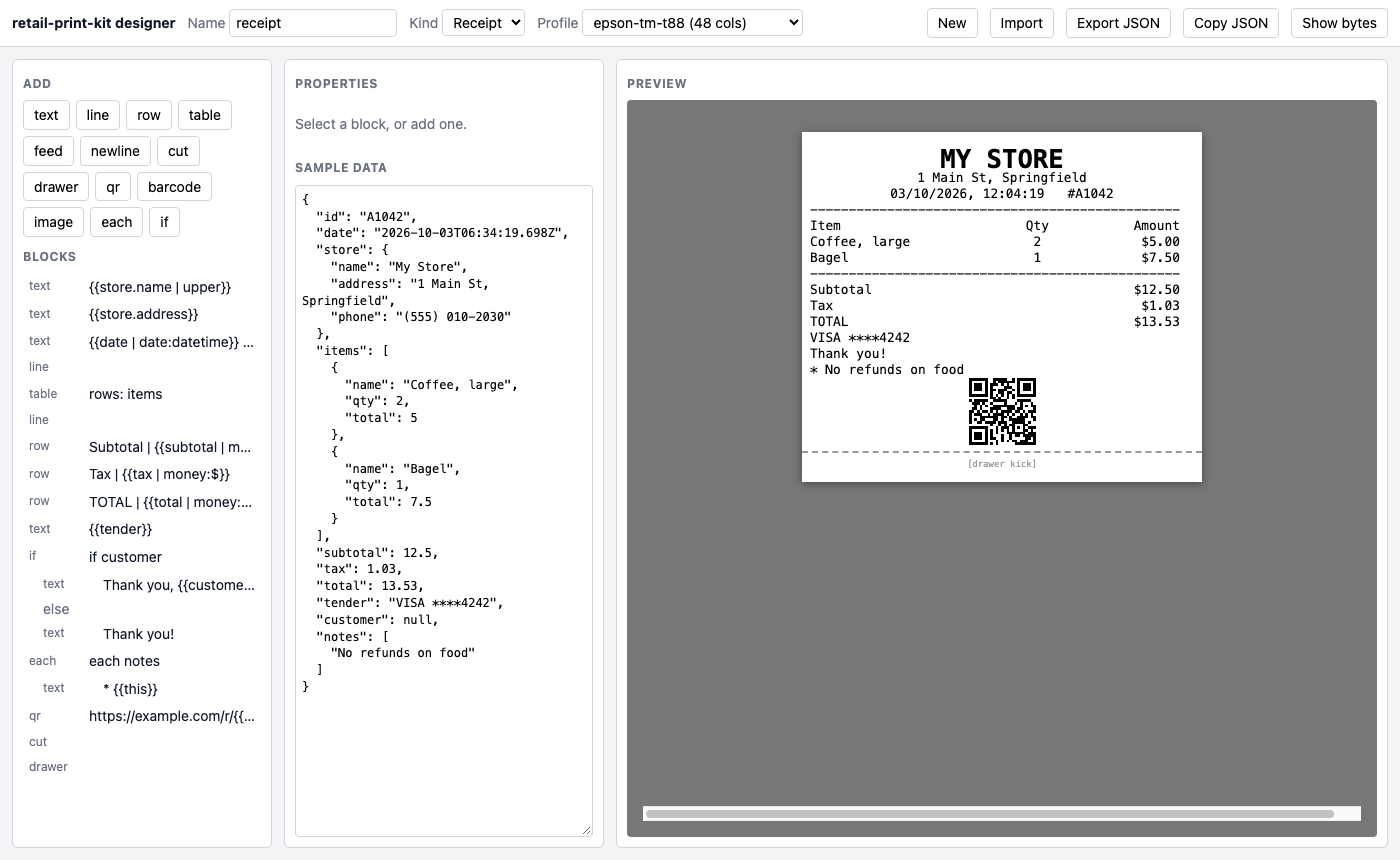
Label mode has drag-to-position and shows the ZPL, TSPL or EZPL it generates.
Guides
- How to print a receipt from Node.js on an ESC/POS thermal printerPrint receipts from Node.js to Epson and other ESC/POS thermal printers over network, USB or serial, with text styles, tables, barcodes, QR codes, paper cut and cash drawer kick.
- Print receipts from an Electron app to a thermal printerSilent receipt printing from Electron to ESC/POS and Star thermal printers without the OS print dialog, using retail-print-kit in the main process with IPC from the renderer.
- Open a cash drawer from Node.js or ElectronKick a cash drawer connected to a receipt printer from Node.js with one call. Works with Epson ESC/POS, Star and compatible printers over USB, network or serial, including pin 2 and pin 5 drawers.
- Print to a Star TSP100 or TSP143 from Node.jsThe Star TSP100 and TSP143 are raster-only printers that ignore ESC/POS text commands. retail-print-kit renders the receipt to a bitmap and prints it, and also supports Star Line Mode printers such as the TSP650II and mC-Print3.
- Print ZPL, TSPL and EZPL labels from Node.jsBuild shelf, price and barcode labels once and print them on Zebra (ZPL), TSC, Xprinter and Rongta (TSPL) or Godex (EZPL) label printers from Node.js, with an SVG preview and JSON label templates.
- Design receipt and label templates visually, then print them from Node.jsA free browser-based receipt and label designer that exports JSON templates. Bind data with placeholders, loop over line items, add conditions, logos, QR codes and barcodes, and print with retail-print-kit.
- Print QR codes and barcodes on a receipt from Node.jsPrint QR codes and UPC-A, EAN-13, CODE128 and CODE39 barcodes on ESC/POS and Star thermal receipt printers from Node.js, using the printer's native commands with an automatic bitmap fallback.
- Design shelf labels in millimetres and print them on Godex or ZebraKeep shelf and price labels as one JSON design in millimetres, preview it exactly as it prints, and print it on Godex (EZPL) or Zebra (ZPL) label printers from Node.js, Electron or the browser.
- Print a logo or image on a thermal receipt printer from Node.jsConvert a PNG or JPEG logo to a 1-bit bitmap with optional dithering and print it on ESC/POS and Star thermal printers from Node.js, centred and scaled to the paper width.
- Find receipt printers on the network and read their status from Node.jsDiscover ESC/POS printers on the local network, identify the maker and model, and read paper-out, cover-open, cutter-error and cash drawer status from Node.js.
- An alternative to escpos and node-thermal-printer, and how to migrateretail-print-kit is a maintained alternative to the escpos and node-thermal-printer npm packages, with the same method names plus Star, label printers, templates and previews. Migration steps and a comparison.
Supported printers
| Family | Profile or encoder | Command set |
|---|---|---|
| Epson TM-T88V / VI / VII, TM-T20III, TM-m30 | epson-tm-t88, epson-tm-t20, epson-tm-m30 | ESC/POS |
| Bixolon, Citizen, SNBC, Xprinter, Rongta, HPRT, POS-X | generic-escpos, generic-escpos-58 | ESC/POS |
| Star TSP650II, TSP700II, mC-Print3 | star-tsp650, star-mc-print3 | Star Line Mode |
| Star TSP100, TSP143 | star-tsp100 | Star raster |
| Zebra label printers | encodeZpl | ZPL II |
| TSC, Xprinter, Rongta label printers | encodeTspl | TSPL |
| Godex label printers | encodeEzpl | EZPL |
Compared with escpos and node-thermal-printer
| retail-print-kit | escpos | node-thermal-printer | |
|---|---|---|---|
| Epson ESC/POS and compatibles | yes | yes | yes |
| Star Line Mode | yes | no | yes |
| Star raster-only (TSP100 / TSP143) | yes | no | no |
| Label printers (ZPL, TSPL, EZPL) | yes | no | no |
| JSON templates and a designer | yes | no | no |
| HTML / PNG / SVG preview | yes | no | no |
| Packages a plain install adds (measured Oct 2026) | 4 | 66 | 7 |
Coming from one of them? Read the migration guide.
Command line
npx retail-print-kit discover --identify          # printers on this network
npx retail-print-kit test --net 192.168.1.50      # test page and status
npx retail-print-kit drawer --usb                 # kick the cash drawer
npx retail-print-kit preview --out receipt.html   # no printer needed
Questions
Does it work in Electron?
Yes, in the main process. The renderer asks for prints over IPC, and the browser build renders previews. See printing receipts from Electron.
Does it need a printer driver?
No. It sends the printer's own commands directly over TCP, USB or serial, so there is no OS print dialog and no driver to install.
Why does my Star TSP100 print nothing with other libraries?
It is a raster-only printer and ignores ESC/POS text. Use the star-tsp100 profile; see the Star TSP100 guide.
Is it free?
Yes. MIT license, source on GitHub.